Frequently Asked Questions about StockCraft
Find answers to common questions about 3D printing business management, cost tracking, and Shopify integration.
StockCraft is a lightweight Manufacturing ERP (Enterprise Resource Planning) system designed specifically for small makers and craft businesses. It provides comprehensive MRP (Material Requirements Planning), Bill of Materials management, inventory control, production planning, and financial reporting - all optimized for very small manufacturers.
StockCraft helps you track material costs, automatically calculate product costs with wastage, integrate sales from Shopify and other marketplaces, manage production workflows, and analyze profitability with enterprise-grade features at small business prices.
If you sell 3D printed items, resin crafts, jewelry, or other manufactured products, StockCraft is built for you. Whether you're a solo maker or run a small manufacturing team, StockCraft provides the ERP functionality you need to understand your true costs and profit margins so you can price products confidently and grow your business profitably.
Yes! StockCraft is a lightweight Manufacturing ERP (Enterprise Resource Planning) system with comprehensive MRP (Material Requirements Planning) capabilities, specifically designed for small makers and craft businesses.
ERP Features:
- Multi-tenant business management platform
- Financial reporting and profit/loss analysis
- Sales integration and order management
- User management and access control
- Comprehensive business analytics
MRP Features:
- Bill of Materials (BOM) management
- Material inventory tracking with reorder points
- Automatic cost calculation based on material usage
- Wastage tracking and material consumption planning
- Production workflow management
Unlike complex enterprise ERP systems, StockCraft is designed to be simple and affordable for very small manufacturers (1-5 users, up to unlimited products).
StockCraft offers two simple pricing tiers:
Free Plan ($0/month):
- Shopify integration (manual & automated)
- Sales quoting
- Unlimited orders
- Up to 50 products
- 1 user
- Basic reporting
Plus Plan ($5/month):
- Everything in the Free plan
- Unlimited products
- Unlimited users
- Advanced reporting & analytics
- Alerting/notifications
- Priority support
No credit card is required to sign up and start using StockCraft. Create your free account today →
We believe in keeping things simple and transparent. You can cancel your subscription at any time directly from your account dashboard - no need to email support or jump through hoops.
When you cancel, your subscription will remain active until the end of your current billing period. This means you won't lose access to any features you've already paid for.
After your billing period ends, your account will automatically revert to the Free plan. You'll keep all your data, but access to Plus features (like advanced reporting and unlimited users) will be paused until you resubscribe.
StockCraft calculates product costs automatically based on your material prices, quantities used, and wastage percentages. Here's how it works:
- You enter material prices per unit (e.g., $20 per kilogram of PLA filament)
- For each component/product, you specify quantities (e.g., 0.15 kg of filament)
- You set wastage percentages to account for support material, failed prints, and material loss
- StockCraft calculates: Cost = Material Price × Quantity × (1 + Wastage %)
When material prices change, product costs update automatically. You can also override costs manually for custom pricing strategies.
Yes! StockCraft integrates with Shopify using real-time webhooks. When a customer places an order on your Shopify store, StockCraft automatically creates a sale record with all the details you need.
The integration includes:
- Automatic order syncing (no manual data entry)
- SKU mapping from Shopify to StockCraft variants
- Cost snapshot at time of sale for accurate profit calculation
- Sales channel tracking (identify which marketplace orders came from)
- Production workflow management from paid to shipped
You can also manually track sales from Etsy, Amazon, craft fairs, and direct sales alongside your Shopify orders. If you already integrate other marketplaces with Shopify (like Etsy or Amazon), those sales will automatically flow into StockCraft through the Shopify integration.
We're actively working on direct integrations with additional marketplaces in the future, making it even easier to track all your sales channels in one place.
Yes, absolutely! StockCraft uses enterprise-grade security to protect your business data:
- Multi-tenant isolation: Each business's data is completely separated
- Encryption: Data encrypted in transit (TLS) and at rest (AES-256)
- Authentication: AWS Cognito with Google SSO support and optional multi-factor authentication
- Infrastructure: Hosted on AWS with 99.9% uptime
- Backups: Regular automated backups with point-in-time recovery
- Compliance: GDPR compliant data handling
Your product costs, sales data, and customer information are private and secure. We never share your data with third parties.
StockCraft is used by makers and crafters across various industries:
- 3D Printing Businesses: Track filament/resin costs, account for support material wastage
- Resin Crafters: Manage complex component hierarchies and material combinations
- Jewelry Makers: Track precious materials, findings, and packaging costs
- Multi-Channel Sellers: Compare profitability across Shopify, Etsy, Amazon, and craft fairs
- Made-to-Order Manufacturers: Track custom orders through production workflows
If you sell handmade or made-to-order products and need to understand your true costs and profit margins, StockCraft is built for you.
Getting started is easy! Follow these steps:
- Create your free account (no credit card required)
- Add your materials (filament, resin, paints, packaging, etc.)
- Build reusable components with automatic cost calculation
- Create products and variants with pricing
- Optionally connect your Shopify store for automated order tracking
- Start tracking sales and generating profitability reports
Check out our complete Getting Started Guide for detailed step-by-step instructions.
Yes! StockCraft is designed with data portability in mind. We provide powerful tools for both moving into the system and taking your data with you if needed.
Importing (Getting In): You can bulk-import materials, products, variants, and customers using CSV or Excel files. Our smart column-mapping tool handles variations in your spreadsheet formats automatically.
Exporting (Getting Out): You can export your data anytime in standard formats:
- CSV/Excel Export: Full data for materials, inventory, products, sales, and reports.
- Financial Reports: Formatted Excel workbooks for tax and accounting.
- PDF Reports: Professional, print-ready summaries of your business performance.
We believe you should always own your data. We never lock you in, and there are no fees or restrictions on exporting your information.
Transitioning from messy spreadsheets is exactly why StockCraft exists! Most users can migrate their entire product and material catalogs in under 15 minutes.
Our migration process is simple:
- Upload: Simply drag and drop your existing Excel or CSV file.
- Map: Match your columns (e.g., "Item Name", "Cost", "SKU") to StockCraft fields using our intuitive interface.
- Validate: We'll scan for errors or missing data and help you fix them before they enter the system.
- Import: With one click, your entire catalog is live and ready for production.
If you have a particularly complex spreadsheet, our support team is happy to help you format it for a smooth transition.
AI Insights is an intelligent analytics feature that provides context-aware business recommendations powered by artificial intelligence. It analyzes your data and delivers actionable insights to help you make better decisions.
Where AI Insights appears:
- Dashboard: Overview of your business performance, trends, and key metrics
- Products Page: Product performance analysis, pricing recommendations, and inventory insights
- Materials Page: Material usage patterns, cost optimization suggestions, and reorder recommendations
- Components Page: Component usage analysis and optimization opportunities
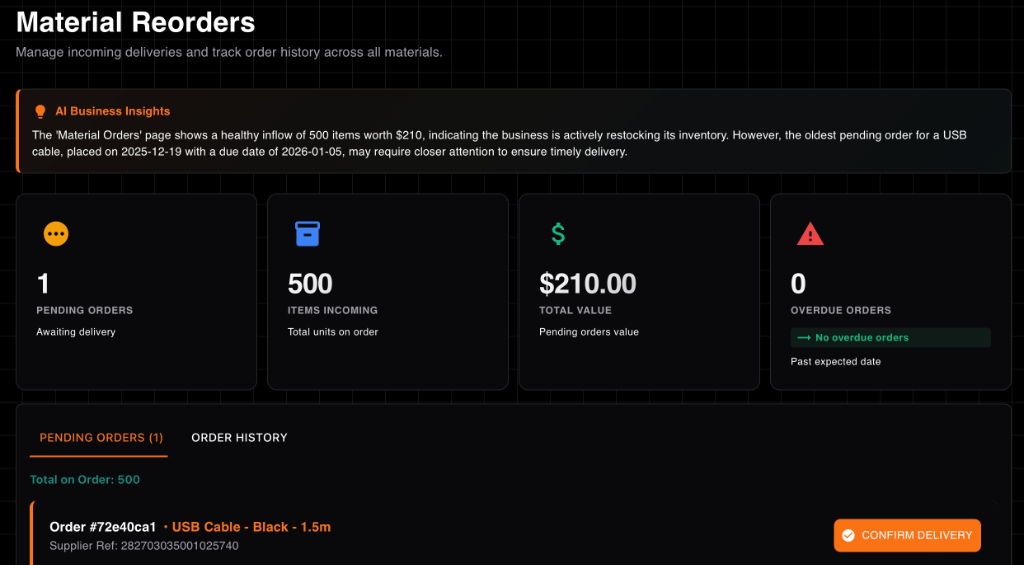
- Material Orders Page: Order timing insights and due date management recommendations
What AI Insights can tell you:
- Which products are most profitable and which need attention
- Material cost trends and opportunities to reduce expenses
- Inventory optimization suggestions to prevent stockouts or overstocking
- Production efficiency insights and bottleneck identification
- Sales trends and seasonal patterns to inform planning
AI Insights is available on both Free and Plus plans, helping makers of all sizes make data-driven decisions to grow their craft business profitably.
Yes! We provide support through multiple channels:
- Contact Us: Use our contact form for support (24-48 hour response time)
- Contact Us: Submit inquiries through our contact page
- Documentation: Comprehensive guides for materials, components, products, sales, and reports
- FAQ: This page answers common questions
Paid plans will include priority support with faster response times.
StockCraft includes powerful Market & Event Management features designed specifically for makers who sell at craft fairs, farmers markets, school fairs, and pop-up events. Track every aspect of your in-person sales to understand which events are worth your time.
What you can track:
- Event Details: Date, location, market type (school, public, etc.), and stall size
- Fees & Costs: Stall fees and setup costs to calculate true profitability
- Cash Management: Starting cash float, end-of-day cash on hand, and cash taken out during the event
- EFTPOS Takings: Track card payments separately from cash
- Time Tracking: Start and end times to calculate hours worked
- Notes: Record weather, foot traffic, or other observations
Automatic calculations:
- Cash takings (Cash on Hand - Float + Cash Taken Out)
- Total takings (Cash + EFTPOS)
- Net earnings (Total Takings - Fees)
- Hourly rate (Net Earnings ÷ Hours Worked)
- Average earnings per event
Smart features:
- Future Events: Schedule upcoming markets to plan your calendar
- Performance Comparison: Compare different market types and locations to find your best opportunities
- AI Insights: Get intelligent recommendations about which events to prioritize
- Dashboard Analytics: View total earnings, average hourly rates, and upcoming events at a glance
This feature is perfect for makers who do a mix of online and in-person sales. Know exactly which craft fairs are worth the time and booth fees, and make data-driven decisions about your market schedule.
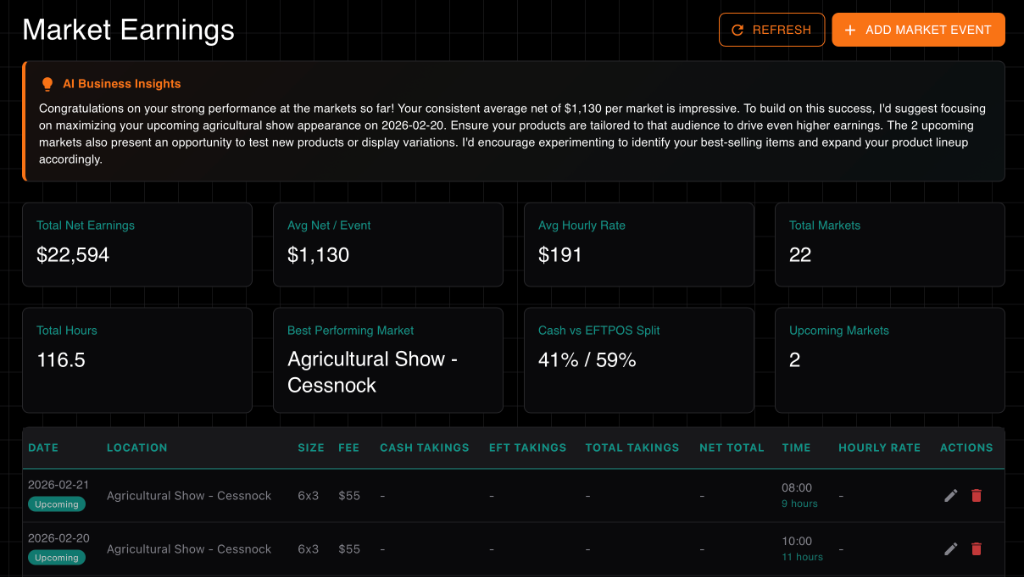
Track profitability per event to optimize your schedule
Yes! StockCraft offers direct API integrations with three popular accounting platforms, so your financial data flows automatically without manual double-entry:
- Xero — Push sales invoices and expenses directly into your Xero organisation
- QuickBooks Online — Sync revenue and purchase records to your QuickBooks company
- MYOB Business — Send invoices and bills to your MYOB company file
The integration pushes completed sales orders as invoices and material purchase expenses as bills to your accounting platform. You can configure the sync date range and trigger syncs manually whenever you need your books up to date.
Note: Accounting integrations are available exclusively on the Plus plan ($5/month). Free-tier users can upgrade at any time to connect their accounting software.
Connect in just a few clicks using secure OAuth — no API keys or passwords to manage. Check our accounting integrations documentation for a step-by-step setup guide.
Still have questions?
We're here to help! Contact us and we'll get back to you within 24-48 hours.
Contact Support